
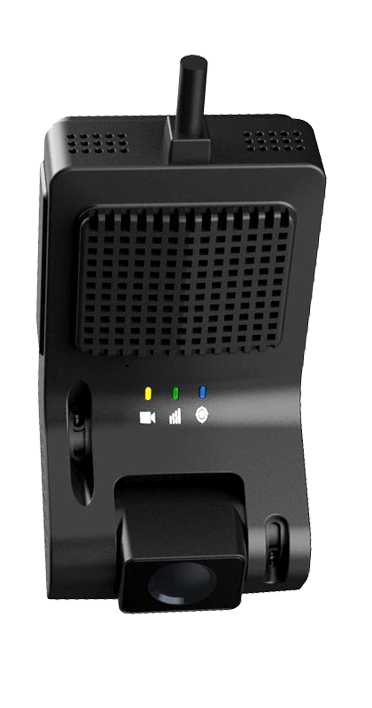
What it is
The M4000 ViewMaster is an AI-powered dash cam with road- and cabin-facing cameras. On-device AI flags risky events as they happen, footage is stored locally with key clips pushed to the cloud, and you can live-stream or pull video on demand from the GPSandTrack platform.
Best for
How it operates
From location fix to live dashboard, here is what happens behind the scenes.
Record continuously
Captures road-facing, and optional cabin, video to local storage.
Detect with AI
On-device AI flags events like distraction, drowsiness, and tailgating.
Save & upload
Incident clips are saved and pushed to the cloud automatically.
Review anywhere
Live stream and pull video on demand. LEDs: power (amber), cellular (pink), GPS (blue).
Where to place it
Mount the ViewMaster high on the windshield, behind the rear-view mirror, with a clear forward view of the road.
Good placement
- +Position behind the mirror with a clear road view
- +Wipe the mounting spot clean before applying the 3M base
- +Route cables neatly along the A-pillar to the upper windshield
Avoid
- −Don't mount the device before the 3M base has set for 2 hours
- −Don't block the camera lenses or the driver's view
- −Don't pinch cables in trim or moving parts
Installation
Most installs take just a few minutes. Here is the process step by step.
Mount to the windshield
Clean the spot, attach the 3M base behind the mirror, and wait 2 hours before the next step.
Connect the cables
OBD power to the unit, GPS antenna to the 4-pin port, plus the optional SOS button.
Route along the A-pillar
Run the cables to the upper center of the windshield, then plug the OBD cable into the vehicle's OBD port — or hardwire to B+/ACC/GND at the fuse box.
Check it works
Verify the LED status and live video; switch between cameras and adjust the lens after logging in.
After applying the 3M mounting base, wait 2 hours before mounting the device. Cabin or auxiliary-camera installs are best done by a professional.
Key information
Specifications at a glance.
Ready to put eyes on every trip?
Get a custom quote or talk to a fleet specialist today.
Get my free quote